 DOCS
Veyzz Report System
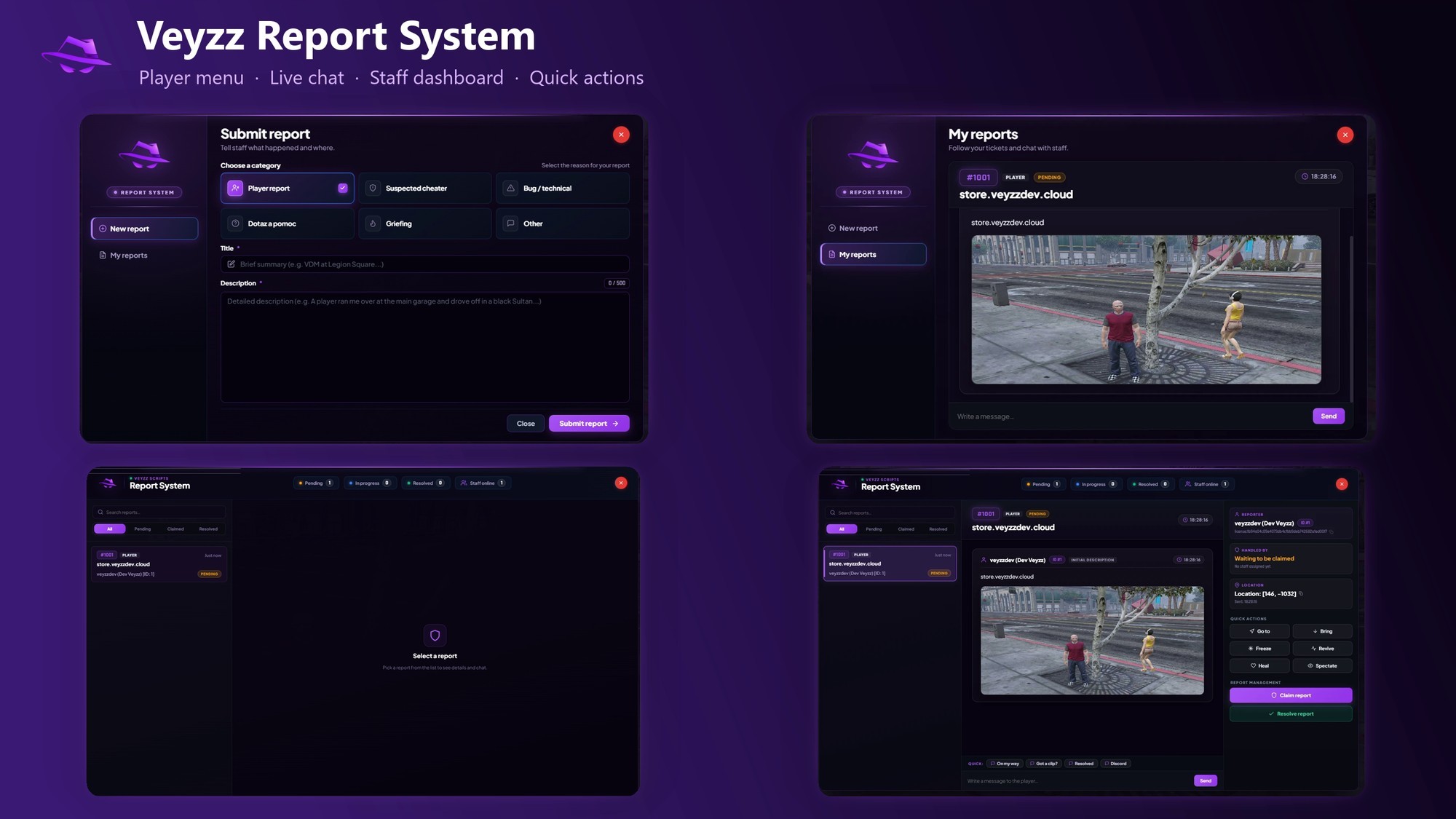
Ticket management and a staff dashboard for FiveM. Players open reports with an automatic screenshot, staff handle them in a live dashboard with chat and quick actions, and everything is logged to Discord.
01 Overview
Veyzz Report System (veyzz_reportsystem) replaces chat-based reporting with proper tickets. It detects your framework automatically and also works standalone.
- Players open
/report, pick a category, describe the problem and get a live chat with staff. - Staff open
/reports(default keyF10) to see every ticket in a live feed. - Discord receives a log for every important event, with separate webhooks per event type.
The script is available in the Veyzz Studio store. Log in with your Cfx.re account when buying; the resource is delivered to your account.
02 Requirements
- A FiveM server artifact with Lua 5.4.
- Optional: screenshot-basic for screenshots on reports.
- Optional: oxmysql to store webhook URLs in the database (recommended).
- Optional: ESX, QBCore or Qbox. The script also works standalone.
03 Installation
- Put the
veyzz_reportsystemfolder into your server'sresourcesdirectory. - Add it to
server.cfg, afterscreenshot-basic,oxmysqland your framework. - Give your staff access with an ACE permission, or add their framework group to
Config.AdminGroups. - Restart the server (or run
ensure veyzz_reportsystem).
# server.cfg
ensure oxmysql
ensure screenshot-basic
ensure es_extended        # or qb-core / qbx_core, skip when standalone
ensure veyzz_reportsystem

# staff access
add_ace group.admin ms.reports allowNo SQL import is needed. When oxmysql is running, the table ms_report_webhooks is created automatically on the first start.
04 For players
Players open the report menu with /report. The sidebar has New Report and My Reports.
- Six categories: player report, suspected cheater, bug / technical, question / help, griefing and other.
- Title and description (up to 64 and 500 characters). The player's location is attached automatically.
- Automatic screenshot with the IDs of nearby players drawn above them, so staff can read them in the image.
- One active report per player at a time and a 30 second cooldown between reports (both configurable).
- Live chat with the staff member who claims the report, and a 1–5 star rating once it is resolved.
05 For staff
Staff open the dashboard with /reports or the F10 key. Access requires the ACE permission ms.reports or a group listed in Config.AdminGroups.
- Live feed with search and status filters: pending, claimed and resolved.
- Claim, release and resolve a ticket, with a closing note on resolve.
- Chat with the reporter, with canned quick replies you define in
Config.QuickReplies. - Quick actions: Goto, Bring, Freeze, Revive, Heal and Spectate.
- Screenshot viewer and one-click copy of identifiers and coordinates.
- The open UI refreshes itself every few seconds, so new messages and claims appear without reopening it.
06 Discord logging
Each event type can have its own Discord webhook. Leave one empty to disable that log.
| Event | When it fires |
|---|---|
| NewReport | A player submits a new report (includes the verified list of nearby players) |
| Claimed | Staff claims a ticket |
| Resolved | A ticket is resolved |
| ChatMsg | Every message in a report chat |
| AdminActions | Staff audit log: Goto, Bring, Freeze, Revive, Heal, Spectate and ticket release |
Add the webhooks as described in Webhook database.
07 config.lua options
| Option | Description |
|---|---|
| Framework | auto, esx, qbcore, qbox or standalone |
| Locale | en. All texts live in locales/en.lua |
| ReportCommand, AdminCommand | Command names (default report and reports) |
| Keybind | Default keys: ReportKey (empty) and AdminKey (F10) |
| AcePermission, AdminGroups | Who counts as staff (default ACE ms.reports) |
| CooldownSeconds | Seconds between new reports per player (default 30) |
| MaxActiveReportsPerPlayer | Open reports per player at once (default 1, staff are exempt) |
| AllowSelfReport | Let players report themselves, for testing only (default off) |
| RetentionHours, MaxResolvedHistory | How long resolved tickets stay in memory (default 48 hours / 100 tickets) |
| Categories | Report categories, colours and requiresTarget |
| Screenshot.Enabled | Capture a screenshot on submit |
| Screenshot.ShowPlayerIds | Draw [ID] above nearby players |
| Screenshot.NearbyRadius | Meters; players in range are verified by the server (default 50.0) |
| Screenshot.UploadWebhook | Optional Discord webhook used to host the screenshot |
| Discord.Webhooks | One webhook per event (see above) |
| QuickReplies | Canned replies for staff |
| EnableRatings | Player rating after resolution (default on) |
| SoundEnabled | Notification sounds in the UI |
| Debug | Print handler diagnostics to the server console |
Change the report categories to fit your server, for example add a "Refund request" category. Each one has an id, label, sublabel, icon and color.
08 Webhook database
Webhooks are stored in the database, so the URLs never reach players. config.lua is a shared script and is visible to clients.
- Requires
oxmysql. Without it the script falls back to the webhooks inconfig.lua. - The table
ms_report_webhooksis created automatically. - Webhooks you put in
config.luaare imported on the first start. Clear them from the file afterwards. - Set
Config.Discord.UseDatabase = falseto turn the database off completely.
Manage webhooks from the server console, or give an admin group command.msreport_webhook:
msreport_webhook set NewReport https://discord.com/api/webhooks/...
msreport_webhook set AdminActions https://discord.com/api/webhooks/...
msreport_webhook set Default https://discord.com/api/webhooks/...
msreport_webhook remove ChatMsg
msreport_webhook list
Keys: NewReport, Claimed, Resolved, ChatMsg, AdminActions and Default (used when an event has no webhook of its own). Only Discord webhook URLs are accepted and list shows them masked.
| Column | Description |
|---|---|
| event_key | Event name (primary key) |
| url | Discord webhook URL |
| updated_by | Who changed it last |
| updated_at | Updated automatically |
Screenshot.UploadWebhook is used by the client to upload screenshots, so it stays in config.lua and is visible to players. Leave it empty to use the screenshot as an embedded image instead.
09 Commands & permissions
| Command | Who | What it does |
|---|---|---|
| /report | Players | Open the report menu (ticket creation and active tickets) |
| /reports | Staff (F10) | Open the staff dashboard |
| msreport_webhook | Console / command.msreport_webhook | Manage Discord webhooks |
# let another group use the webhook command
add_ace group.admin command.msreport_webhook allow
10 FAQ
Does it work without a framework?
Yes. With Config.Framework = 'auto' it binds to ESX, QBCore or Qbox when one is running, and otherwise runs standalone.
Reports have no screenshot. Why?
Screenshots need screenshot-basic to be started before this resource, and Config.Screenshot.Enabled to be on.
Are tickets saved after a restart?
No. Tickets are kept in memory only and are lost when the resource restarts. Discord logs keep the history.
Can I translate it?
The resource is English only. Every UI text and notification is editable in locales/en.lua.
Staff cannot open /reports.
Check that they have the ACE permission ms.reports or are in a group listed in Config.AdminGroups.
Can I use it on more than one server?
One purchase covers one server and its test server. Reselling, leaking or redistributing the files is not allowed (see LICENSE.txt).
11 Changelog
1.0.0
- Sidebar layout for players, one active report per player by default, full-page chat.
- Staff dashboard with live feed, claim / release / resolve, quick actions and Discord logging.
- Strict server-side validation of all events, chat flood guard,
Config.Debug. - Live refresh of the open UI; screenshots are sent once instead of in every update.
- New purple Veyzz theme, English only, safer production defaults (30 s cooldown, self-reports off).
12 Support
Questions, bugs or feature requests: open a ticket on our Discord. Please include your server artifact version, framework and the console output.